On This Page
- Key Takeaways
- What Is a Customer Portal, and Why Does Your Business Need One?
- What Features Does a High-Impact Customer Portal Need?
- How Does the Customer Portal Development Process Work?
- Custom Development vs. Off-the-Shelf Software: Which Is Right for You?
- Why Partner with Vezert for Your Portal Development?
- The Strategic Imperative: Your Next-Generation Customer Portal
Customer portal development is the engineering of a secure, authenticated web platform where B2B and enterprise clients manage orders, invoices, support tickets, and onboarding workflows in real time via bidirectional ERP and CRM integration, deflecting 45% to 60% of tier-1 support tickets for investments of €12,000 to €45,000+.
According to Salesforce's State of the Connected Customer report, 61% of customers prefer resolving issues via self-service rather than contacting a live agent. Strategic customer portal development turns client service from a reactive cost center into a retention engine backed by our custom web portal development services and our Complete Web Portal Development Guide.
Key Takeaways
- A modern customer portal is a strategic asset that gives users self-service, directly reducing your support overhead and increasing customer retention.
- Discover the essential AI-driven features, from personalized dashboards to predictive support, that transform a basic portal into a high-impact user experience.
- A structured customer portal development process ensures your project aligns with key business goals, moving from initial strategy to a successful launch without costly missteps.
- Learn how to decide between off-the-shelf software and a custom solution to ensure your portal delivers a unique brand experience and scales with your future growth.
What Is a Customer Portal, and Why Does Your Business Need One?
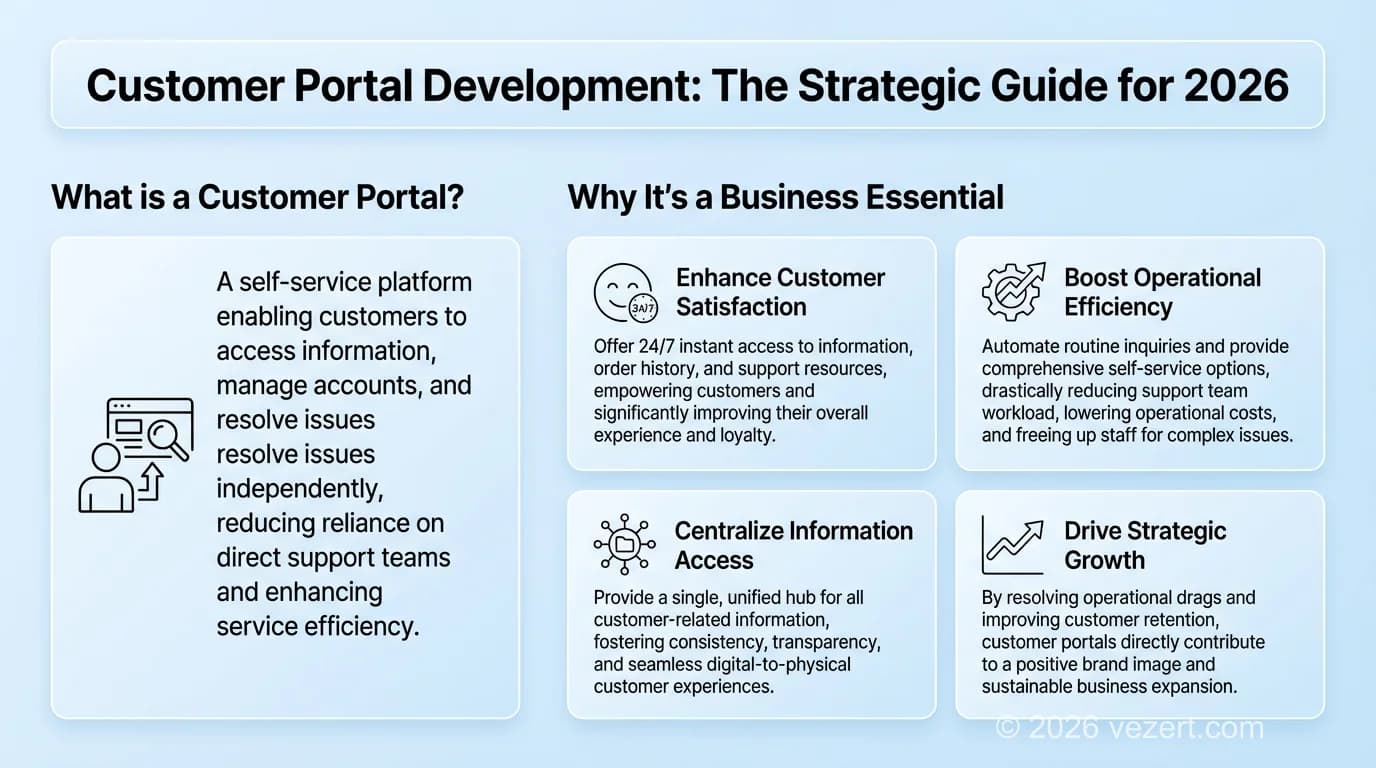
A customer portal is much more than a mere login page; it is a secure and integrated digital gateway which offers your clients direct access to their data, support resources, and account management. Its primary goal is to give users on-demand, self-service capabilities, transforming the customer relationship from reactive to proactive. While the foundational answer to "what is a customer portal" points to a simple information gateway, today's portals are dynamic experience hubs designed to build long-term loyalty, not just close support tickets.
Effective customer portal development moves beyond static information and creates a centralized, high-value ecosystem for your users. It's the digital handshake that reinforces your brand promise 24/7.
The Evolution: From Simple FAQ to AI-Powered Command Center
The customer portal experience reflects the development of digital expectations. Early portals were ordinary pages with basic ticket forms and knowledge bases. Today, they are interactive hubs featuring personalized dashboards, real-time order tracking, and integrated communication tools. The future is even more intelligent: AI-driven portals will proactively suggest solutions, predict user needs, and deliver data-backed insights directly to the customer, turning a support tool into a strategic business asset.
Core Business Benefits of a Modern Customer Portal
Investing in a custom portal delivers measurable, high-impact results that directly affect your bottom line and brand perception. According to Gartner, companies that invest in self-service portals reduce their customer service costs by up to 25% on average. It's a conversion-first strategy focused on customer retention and operational efficiency.
- Drastically Reduce Costs: By enabling self-service for common queries like order status or invoice retrieval, you slash support ticket volume and lower operational overhead.
- Increase Customer Satisfaction: Instant access to information and tools improves CSAT and NPS scores by giving customers the autonomy and speed they expect.
- Boost Customer Retention: A smooth, valuable, and personalized portal experience becomes a competitive differentiator that keeps customers loyal.
- Create New Revenue Opportunities: Use user data to offer personalized recommendations, creating organic opportunities for upselling and cross-selling within the portal.
Key Use Cases: B2B vs. B2C Portals
Strategic customer portal development recognizes that different business models require different features. The architecture must be tailored to the specific needs of the end-user to be effective.
- B2C (Business-to-Consumer): Focus is on a clean UX for high-volume activities like personal account management, order tracking, loyalty programs, and community engagement.
- B2B (Business-to-Business): Emphasizes complex functionality such as bulk order management, detailed invoicing, tiered pricing, and role-based access for different team members within a client's organization. According to Forrester Research, 72% of B2B buyers expect a self-service portal to be available by the second year of engagement with a vendor.
- SaaS (Software-as-a-Service): Provides critical access to subscription details, usage data, API documentation, and in-app support resources.
For businesses in the ecommerce space, our Ecommerce Portal: The Complete Guide to Building a High-Growth Platform explores the platform architecture in detail.
Self-Service by the Numbers
According to Salesforce, 61% of customers prefer to resolve issues via self-service. Gartner reports companies with mature self-service portals reduce support costs by up to 25%. A well-built customer portal pays for itself within the first year of operation.
Verified operational performance gains across B2B enterprises within 12 months of launching an authenticated self-service customer portal connected to ERP and CRM systems. Source: Gartner Customer Service & B2B Portal Benchmarks.

What Features Does a High-Impact Customer Portal Need?
A customer portal cannot be simply a list of functions, but a carefully crafted online experience that is effectively designed to be efficient. Effective customer portal development focuses on a strategic feature set that aligns with your business objectives and simplifies the entire user journey. While the perfect combination depends on your unique goals, a high-impact portal is built on three core pillars of functionality.
Foundational Self-Service & Account Management
These are the non-negotiable elements that help users and reduce your operational load. They constitute the foundation of user freedom, providing instant access to essential information and care without requiring your team to be involved.
- Secure Login & Profile Management: Effortless and secure access with options like Single Sign-On (SSO), coupled with simple tools for users to manage their own contact details and preferences.
- Centralized Knowledge Base: An intelligent, searchable repository of articles, FAQs, and guides that provides 24/7 answers, deflecting common support queries.
- Support Ticketing System: A transparent system for submitting, tracking, and reviewing support requests, eliminating email clutter and providing a clear audit trail.
Engagement & Communication Tools
Your portal should not be a mere place of activity, but an interactive one. These tools convert a passive resource into a proactive communication medium, ensuring better customer relationships and data to optimize from.
- Secure Messaging Center: Enables direct, two-way conversations within the portal, ensuring sensitive information remains secure and communication is centralized.
- Automated Notifications: Keeps users informed with real-time updates on ticket statuses, upcoming invoices, or new feature announcements, enhancing transparency.
- Feedback & Surveys: Integrated tools to capture user sentiment directly, providing invaluable insights to improve your products and services.
Advanced & Business-Specific Functionality
This is where a portal stops being a support tool and becomes a business asset. For B2B companies, features like Role-Based Access Control (RBAC) are a business essential, as they allow different team members to have specific permissions, directly improving client productivity. Such customized features are automated and provide grounded value.
- Invoice & Payment Management: Allows clients to view billing history, download PDF invoices, and make secure online payments, accelerating your cash flow.
- Order & Subscription Management: Provides real-time visibility into order statuses and shipment tracking or allows users to manage service tiers independently.
- Role-Based Access Control (RBAC): Critical for B2B clients, this grants different levels of access and permissions to various users within the same client account.
Enterprise Security, SSO, and Multi-Tenant RBAC
Under GDPR Articles 28 and 32, enterprise customer portal development integrates federated Single Sign-On (SSO) via SAML 2.0 and OpenID Connect (OIDC) with Microsoft Entra ID, Okta, or Google Workspace. Multi-tenant Role-Based Access Control (RBAC) isolates corporate client hierarchies so buyers place orders, finance controllers approve SEPA or Stripe invoices, and executives view SLA analytics using AES-256 encryption, TLS 1.3, immutable audit logs, and EU data residency.
Avoid Feature Bloat
The most common mistake in customer portal development is building every possible feature at once. Start with the 3 to 5 features your users need most, identified through user research, then expand. Portals with too many underused features have 34% lower adoption rates than focused, well-designed ones.
How Does the Customer Portal Development Process Work?
Transforming an idea into a high-performing customer portal requires more than just code; it demands a strategic partnership and a proven methodology. Our structured approach to customer portal development demystifies the journey from concept to launch, ensuring every decision is aligned with your business goals and delivers measurable results.
Step 1: Discovery & Strategic Planning
This foundational step is where we align the portal's functionality with your core business goals. We collaborate with your team to define clear Key Performance Indicators (KPIs), map out critical user personas and their journeys, and conduct a thorough technical audit of your existing systems to plan the integration.
Step 2: Conversion-Focused UX/UI Design
Our Conversion-First Design philosophy takes center stage here. We articulate strategy into an actual user experience by developing intuitive wireframes and user flows for important tasks. The result is a clean, on-brand UI that builds trust and an interactive prototype that allows for real-world user testing and feedback before development begins.
Step 3: AI-Powered Agile Development
This is where efficiency is found in engineering. Using our AI-powered workflows, we build your portal using the optimal technology stack (such as React, Node.js, or Laravel) in agile sprints. This iterative approach provides flexibility and quick progress. A structured Secure Software Development Framework (NIST SSDF), backed by research, emphasizes building solid security measures from day one, not as an afterthought. Discover how AI is reshaping the industry in our article AI-First Web Development: How Modern Agencies Build Websites Faster and Better.
Step 4: Critical System Integrations
Integration is the key to a portal. We connect your platform with your core business tools to create a single source of truth between your customers and staff. Key integrations include:
- CRM (e.g., Salesforce, HubSpot): For a 360-degree customer view.
- ERP/Billing Systems: For real-time access to invoices and account data.
- Helpdesk Software (e.g., Zendesk, Jira): For support ticket management.
Step 5: Launch & Continuous Optimization
Launch is not the ending point but the beginning of optimization. Once testing is complete and smooth deployment is ensured, we track performance against the KPIs defined in Step 1. Our user behavior and feedback analysis identifies opportunities for continuous improvement so your portal delivers the highest ROI long-term.
Bidirectional ERP, CRM, and Helpdesk Synchronization
We engineer resilient REST and GraphQL middleware using idempotent webhook queues and Redis caching between your Next.js portal and HubSpot, Salesforce, SAP S/4HANA, Odoo, and Zendesk, guaranteeing sub-200ms dashboard loads even during ERP maintenance windows.
Typical Project Timeline
A well-scoped customer portal development project typically takes 10 to 18 weeks from kickoff to launch: Discovery (2 to 3 weeks), UX/UI Design (3 to 4 weeks), Development & Integrations (4 to 8 weeks), Testing & Deployment (1 to 3 weeks). Our AI-powered workflows compress timelines by up to 30% compared to traditional agency processes.
Custom Development vs. Off-the-Shelf Software: Which Is Right for You?
The question of how to build your portal is the same as the question of renting an apartment or building a custom home. Renting is fast and affordable, yet you follow the landlord's design. Building your own has higher upfront costs, but everything is tailored to your needs and fits the situation well in the long run. The best decision for your business depends on your long-term goals, not the initial price tag.
When to Use Off-the-Shelf Portal Software
For startups or businesses with highly standardized processes, a pre-built solution can be a practical entry point. It provides fast market access at a reduced upfront price. However, this speed comes with significant trade-offs that can hinder growth.
- Pros: Lower initial investment and faster setup time.
- Cons: Limited customization, potential for vendor lock-in, and recurring subscription fees that increase the total cost of ownership over time. For a strategic perspective on corporate web projects, see our how to commission a corporate website.
The Case for Custom Customer Portal Development
Growth-focused companies with unique workflows or complex integration needs quickly outgrow the limitations of generic software. This is where custom customer portal development delivers unparalleled ROI. A bespoke portal is more than a tool, it's a strategic asset engineered to enhance efficiency and drive conversions.
- Pros: Complete control over features and UX, perfect brand alignment, and a scalable architecture built to support your future growth.
- Cons: Higher upfront investment and a longer development timeline.
It is ultimately a decision about operational efficiency and customer experience. While an off-the-shelf solution provides a temporary fix, a custom portal is built to be a lasting competitive advantage. Not sure what strategy will provide the most effective outcome for your business? Get a free consultation to see which path is right for you.
2026 European Customer Portal Investment Tiers
- MVP Self-Service Client Portal (€12,000 to €20,000): Built on Vezert's €9,000 portal baseline, covering authentication, document and invoice vault, ticket tracking, and a single CRM connection in 6 to 10 weeks.
- Bidirectional ERP & CRM Portal (€20,000 to €45,000): Adds multi-role corporate RBAC, live two-way sync with SAP, Odoo, or Salesforce, automated billing, and SLA dashboards in 10 to 16 weeks.
- Multi-Tenant Enterprise Ecosystem (€45,000+): Federated SAML 2.0/OIDC SSO, multi-subsidiary hierarchies, custom contract pricing, and high-availability EU cloud infrastructure.
For public lead generation, compare our corporate website development services, corporate website vs. landing page, and website redesign costs.

Why Partner with Vezert for Your Portal Development?
Choosing the right engineering partner for customer portal development directly determines user adoption, data security, and three-year return on investment. At Vezert, we architect conversion-focused, API-first platforms that eliminate operational bottlenecks from day one.
An AI-First, Conversion-Driven Engineering Approach
Our AI-assisted engineering workflows accelerate delivery timelines while enforcing strict code quality and automated security testing. Every interface component and onboarding flow is structured around rapid task completion and measurable self-service adoption.
Deep ERP and CRM Integration Expertise
A customer portal creates maximum value when it acts as a unified layer across your CRM, ERP, and billing stack. We eliminate data silos and manual spreadsheet workarounds, delivering automated workflows, higher client adoption, and centralized account intelligence. Start your project with Vezert today.
The Strategic Imperative: Your Next-Generation Customer Portal
In 2026, an authenticated customer portal is a foundational engine for B2B retention and margin expansion. Success depends on prioritizing high-impact self-service workflows, enforcing GDPR-grade multi-tenant security, and selecting the right architecture for your integration complexity.
At Vezert, our customer portal development practice combines rapid agile delivery with deep ERP and CRM orchestration to build platforms that scale with your organization. Ready to build a portal that delights users? Start Your Project Today. For a foundational overview of role-based authentication and data orchestration, see our knowledge base entry on web portals.
On This Page
- Key Takeaways
- What Is a Customer Portal, and Why Does Your Business Need One?
- What Features Does a High-Impact Customer Portal Need?
- How Does the Customer Portal Development Process Work?
- Custom Development vs. Off-the-Shelf Software: Which Is Right for You?
- Why Partner with Vezert for Your Portal Development?
- The Strategic Imperative: Your Next-Generation Customer Portal